Showing posts with label Excel. Show all posts

Friday, January 1, 2021

Homepage

Heartbeat of Taiwan

Cloud: Dropbox | OneDrive |
My Web: Picturetrail | Download youtube |
Social Network: Facebook | Flickr |
Email: Gmail | Yahoo | Outlook |
Search: Google | Bing | Youtube |愛學電腦 |
Translator: Google translate | Bing |
Health: 自療老年癡呆 |
Computer:


      Excel
    Office
  1. Paste Picture Link |
  2. Use " FX" to set Today / Month / Year in Excel |
  3. To create a drop-down list in Excel
  4. Special Type in Excel |
  5. Print Title in Excel |
  6. Duplicate in Excel |
  7. Spin Button in Excel |
  8. Validation in Excel |
  9. Filter in Excel |
  10. Pivot Table in Excel |
  11. Two lines in One-Word |
  12. Chart in Excel |
  13. WordArt |
  14. Lock-Protect Sheet |
  15. Three tips for spotting malware |
  16. 2 Worksheet Arrange in Excel |
  17. Sort-Excel |
  18. Transpose in Excel | 
  19. Data - Consolidate (合併計算) |
  20. Microsoft Save as PDF |
  21. Excel (If & $) 
  22. Restore 'Open With' Command |
  1. Repair Chorme |
  2. Set Office Password |
  3. Add Tab - Developer |
  4. Table - HTML code |
  5. Form (Data List) in Excel |
  6. Watermark in Word |
  7. How to remove Auto Hyperlinks on Office |
  8. Landscape/Margins/Columns |
  9. Word Mail Merge | 

Tuesday, May 27, 2014

Paste Picture Link


Sheet 1: Highlight / Copy / 

Sheet 2: Paste Picture Link

Today / Month / Year in WORD & EXCEL


Today / Month / Year :

1) Word: Insert / Date & Time / Check "Update automatically"


2) Excel : Use  " FX" to set Today / Month / Year 

1,
=TODAY()
2,
=MONTH(TODAY())
3,
=YEAR(TODAY())

To create a drop-down list in Excel


  1. Start Excel and open a new, blank worksheet. 
  2. In cell A1, type "Select", and then select cell B1. 
  3. On the Data menu, click Validation, and then click the Settings tab. 
  4. From the Allow list, click List. 
  5. In the Source box, type the following values: Male,Female,


To create a drop-down list from values on the same worksheet


  1. Type some menu starting at cell E4. 
  2. Select the cell that contains the list you created earlier (cell B1, unless you chose otherwise), and then, on the Data menu, click Validation. 
  3. Replace the list that you typed manually with the following value: =E4:E8 (Word,Excel,PowerPoint,Photoshop,Quickbook). 
  4. Click OK, and then select a value from the list.


Tuesday, May 20, 2014

Special Type in Excel

1, Starting from 0 : use ' type.

2, Office button / Excel Options / Formulas / Uncheck “Numbers formatted as text …”


after unchecked "numbers formatted as text...."

  More Format Numbers / Custom / "7187621900"@ or (718) ###-####


Print Title in Excel


Page Layout / Print Titles / Sheet / Rows to repeat at top / Highlight Title /print Preview / Next Page


Duplicate in Excel


Tuesday, May 13, 2014

Spin Button in Excel

1,Add Tab - Developer:Office Button / Excel Options / Popular / Show Developer tab in the Ribbon


2,Developer / Insert / Spin button / Draw / Right Click / Format Control / 


Developer / Insert / Spin button / Draw / Right Click / Format Control /                      


Tuesday, May 6, 2014

Form (Data List) in Excel

Quick Access Toolbar / More Commands / Commands Not in Ribbon / Form / Add / OK

1.Highlight Menu / Form


Validation in Excel


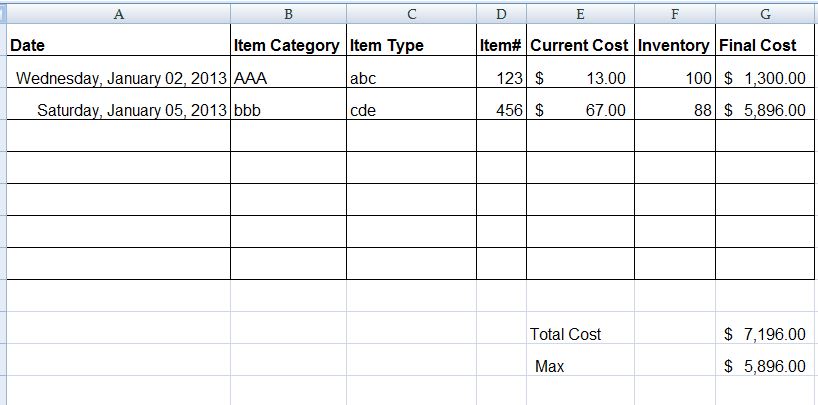
1. Date ( 2013) : Data / Data Validation


2. Whole number: Item# and Inventory


Tuesday, April 29, 2014

Filter in Excel

  1. Highlight / Data / Filter
  2. Symbol / Select "INTC"
  3. Highlight / Type / Ctrl + Enter
  4. Symbol / Select All

Tuesday, April 1, 2014

Lock-Protect Sheet

1. Select Cells/ Right Click/ Format Cells


2. Review / Protect Sheet